Game Vault 999 Account Limits Guide
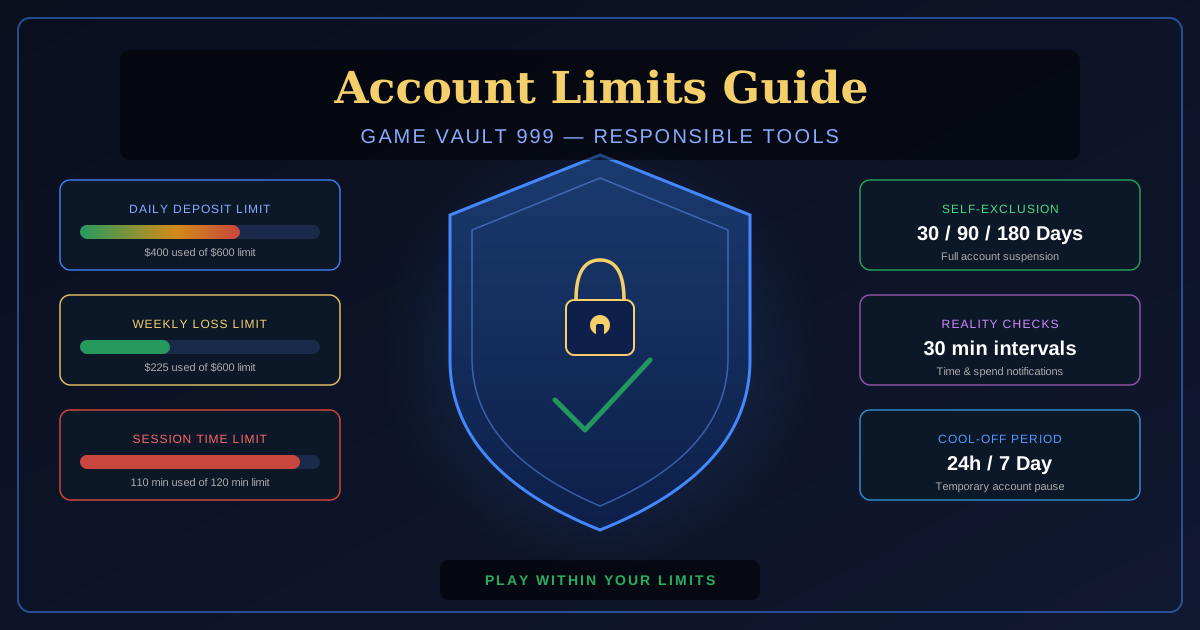
Game Vault 999 offers deposit limits, loss limits, session time limits, cool-off periods, and self-exclusion tools, and this guide shows how to set each one.
Game Vault 999 operates as a social sweepstakes platform, not a state-licensed casino — availability varies by location, so check your local laws. As part of its responsible gaming commitment, it provides responsible gambling tools to all account holders. These tools — deposit limits, loss limits, session time limits, cool-off periods, and self-exclusion — are available in your account settings at any time and are designed to help you stay within your intended budget. This guide explains exactly how each tool works and how to activate or modify it. For new players, check out the download the Game Vault 999 app.
How to Access Responsible Gambling Settings
- Log in to your Game Vault 999 account.
- Tap the profile icon (top right on mobile, sidebar on desktop).
- Select Account Settings.
- Tap Responsible Gambling or Limits & Controls.
- All available limit tools are displayed on this screen.
Deposit Limits
Deposit limits restrict the total amount you can deposit within a rolling time window. You can set a daily, weekly, or monthly limit. For new players, check out the full Game Vault 999 game library.
| Limit Type | Rolling Window | How It Works | Change Takes Effect |
|---|---|---|---|
| Daily Deposit Limit | Last 24 hours | Cannot deposit more than X in any 24-hour rolling period | Immediately if reducing; 24h delay if increasing |
| Weekly Deposit Limit | Last 7 days | Cannot deposit more than X in any 7-day rolling period | Immediately if reducing; 7-day delay if increasing |
| Monthly Deposit Limit | Last 30 days | Cannot deposit more than X in any 30-day rolling period | Immediately if reducing; 30-day delay if increasing |
When you reduce a deposit limit, the new lower limit takes effect immediately. When you increase a deposit limit (or remove one), there is a mandatory cooling-off delay before the increase takes effect — this prevents impulsive increases during a losing session.
Loss Limits
Loss limits cap your net loss (deposits minus withdrawals plus credited amounts) over a rolling window. Loss limits track real-money losses only — bonus credits do not count toward the loss calculation.
| Limit Type | Window | Change Takes Effect on Increase |
|---|---|---|
| Daily Loss Limit | 24 hours | 24-hour delay |
| Weekly Loss Limit | 7 days | 7-day delay |
| Monthly Loss Limit | 30 days | 30-day delay |
Session Time Limits
Session time limits set a maximum continuous play duration per login session. When the limit is reached, you receive a warning and are automatically logged out after a short grace period.
- Configurable in 30-minute increments from 30 minutes to 8 hours.
- The timer resets only when you log out — tabbing away or locking your screen does not pause the timer.
- After automatic logout, you must wait 30 minutes before logging back in (cool-down window built into time limit enforcement).
- Session time limits take effect immediately regardless of increase or decrease direction.
Reality Checks
Reality checks are pop-up notifications that appear at set intervals during a session, showing your time played in the current session and your net play result (wins minus losses). You can set checks at 30, 60, or 90-minute intervals. Reality checks do not interrupt gameplay — they are informational overlays you dismiss. They are designed to maintain awareness of time passed during sessions.
Cool-Off Periods
A cool-off period temporarily suspends your account for a set duration — 24 hours, 72 hours, 7 days, or 30 days. During a cool-off period, you cannot log in, deposit, or place bets. Your account and balance are preserved. Cool-off periods take effect immediately and cannot be reversed once activated — you must wait until the full period expires.
Cool-off is appropriate if you feel you are playing more than intended but do not want the permanent nature of self-exclusion. It provides a defined break with an automatic return.
Self-Exclusion
Self-exclusion is the strongest responsible gambling tool — it suspends your account for 30, 90, or 180 days with no option for early return. You cannot log in, deposit, or play during any self-exclusion period. Funds in your account are not forfeited — they are held and returned at the end of the exclusion period upon identity verification.
To self-exclude: Account Settings → Responsible Gambling → Self-Exclusion → Select duration → Confirm with account password.
Problem Gambling Resources
If you or someone you know is struggling with gambling, free confidential help is available 24/7:
- National Problem Gambling Helpline: 1-800-522-4700 (call or text, 24/7)
- National Council on Problem Gambling: ncpgambling.org
- Gamblers Anonymous: gamblersanonymous.org
- SAMHSA Helpline: 1-800-662-4357
Can I set a loss limit below my current session loss?
Yes. If you set a loss limit of $200 and you have already lost $150 in the current session, the limit is active immediately and will trigger when your session loss reaches $200 — in this example, $50 more. The limit does not retroactively block access; it prevents further losses above the threshold.
Do my limits reset if I create a new account?
No. Self-exclusion and account limits are registered to your identity (name, date of birth, address) not just your account credentials. Creating a new account to bypass an active exclusion or limit is a violation of Game Vault 999's terms of service and may result in permanent account closure.
Is there a minimum deposit limit I can set?
The minimum configurable deposit limit is $50 per day. You cannot set a deposit limit below $50 per day (as this would prevent normal micro-session gameplay). There is no maximum — you can set the limit to any value at or above $50.
Do account limits affect my VIP tier?
No. Setting limits does not affect your VIP tier calculation or benefits. VIP tiers are based on wagering volume, not account configuration. You can be a Diamond VIP member with active deposit and loss limits.
How do I know a limit is active?
Active limits are shown in the Responsible Gambling settings screen with their current threshold and rolling window start date. A green indicator shows limits below threshold; a yellow indicator appears when you are above 70% of the limit; a red indicator appears when you are within $10 or 10% of the limit.
Ready to play Game Vault 999?
Claim your 100% welcome bonus and experience 5-minute payouts.
Get Started Free